Free AI Object Remover
Upload a photo, brush over what you don't want or type it in, and the AI erases it and fills the gap so it looks like it was never there.
Object Removal Examples
Tap one to load its photo, brush marks and text, then press Remove Objects.
 Before
 Remove people
Drag & drop or browse
PNG, JPG, JPEG or WEBP (max 10MB each)
0/1 uploaded
JPG, PNG or WebP. After uploading, brush over what you want to remove.
Upload a photo to get started.
AI Object Remover: Before and After
Every result below was made with this tool, from the photo on the left and the text or brush marks named under it. Nothing was retouched.


Remove people
Most of the tourists walking around the square are removed. She, the fountain and the buildings stay as they were.
"people in the background"


Brush to remove
Three identical umbrellas. Only the one brushed in red is removed, together with its shadow.
Brush


Remove watermark
Repeated watermark text and the corner credit are cleared from a landscape photo.
"watermarks and text"
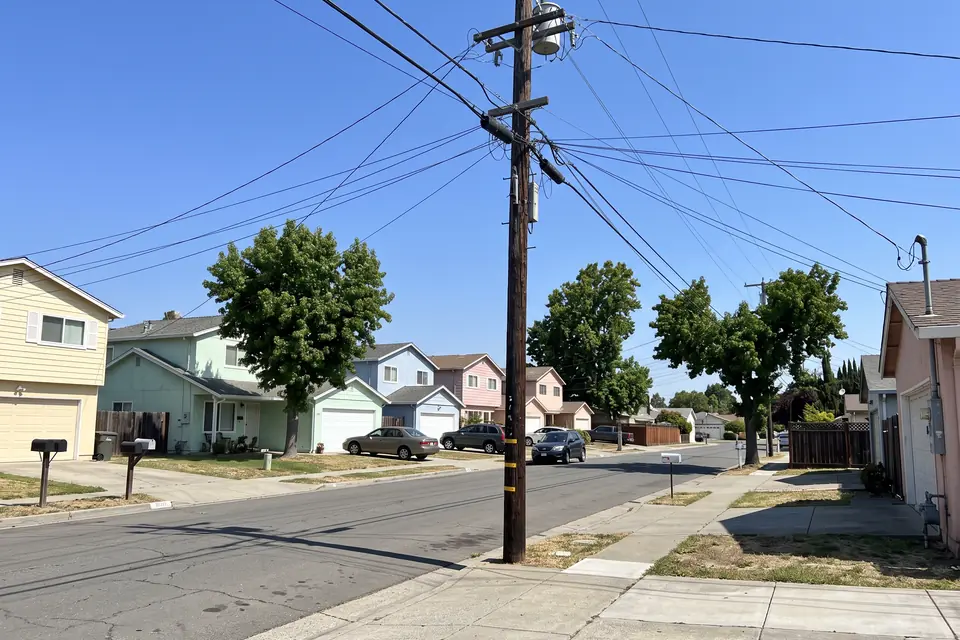

Remove power lines
The utility pole and every wire across the sky are erased, leaving a clear blue sky over the street.
"all overhead power lines, cables, wires and utility poles"
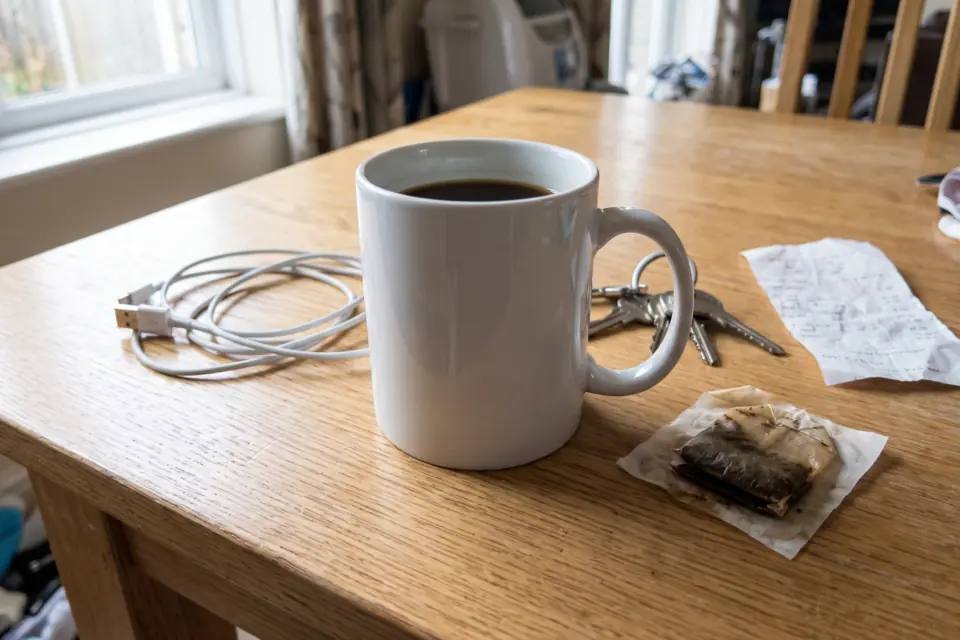
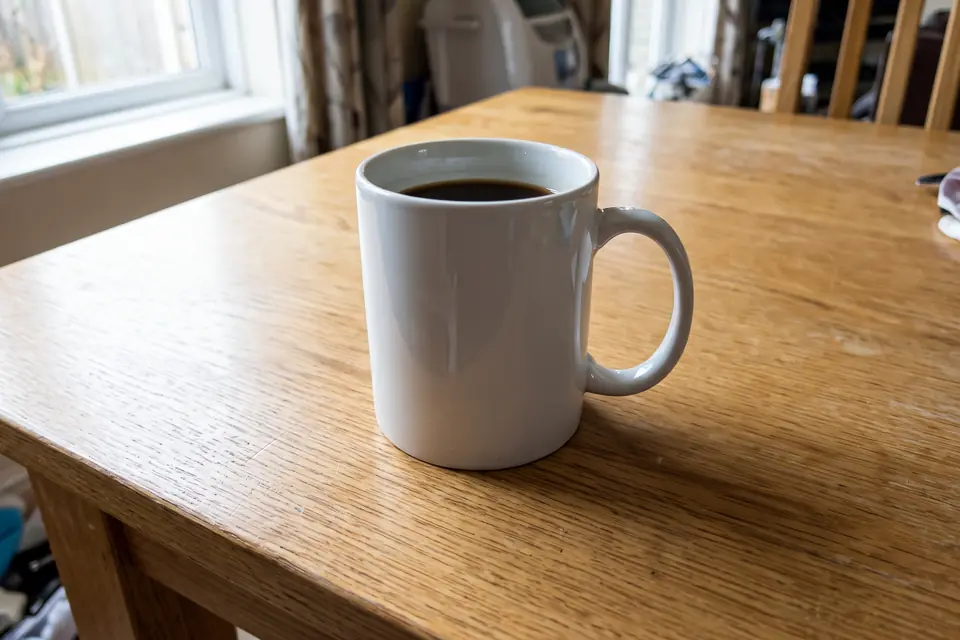
Clean up a product photo
A charging cable, keys, a receipt and a tea bag are removed so only the mug is left.
"clutter and stray objects"


Declutter a room
Laundry, boxes, shoes and most of the toys are gone, ready for a listing photo.
"clutter and stray objects"
Remove Unwanted Objects From Photos
Clean up travel shots, product photos, listings and anything else with a distraction in it.
Remove People and Tourists From Photos
Strangers walking through your shot? Remove a person or a whole crowd from the background and keep yourself and the view.
Clean Up Product Photos
Erase cables, price tags, dust and stray props around a product before it goes on Amazon, Etsy or Shopify.
Declutter Real Estate Photos
Clear laundry, boxes, toys and bins from rooms so buyers see the space, not the mess.
Watermark Remover for Photos
Remove watermarks, date stamps, captions, logos and other text from images you own or have the rights to use.
Remove Power Lines From the Sky
Wires and poles cutting through a sunset or a skyline are easy to brush away.
Tidy Up Photos for Social Media
Remove a photobomber, a trash can or a car from the shot before you post it.
How to Remove Objects From Photos Online
Three steps in your browser. No app to install.
- 1
Upload your photo
JPG, PNG and WebP work, from your phone or your computer.
- 2
Mark what to remove
Brush over or circle it in red, or type it in the box, like "the man in the red shirt". The suggestions under the box fill it in for you, like power lines or watermarks.
- 3
Remove and download
Press Remove Objects. The clean photo shows up next to the tool with a before and after slider, and it is saved to My Creations.
Tips for a cleaner result
- When there are several similar things, brush over the one you want gone. Typing alone may remove all of them.
- A rough brush or a circle is enough. You don't need to cover every pixel, and shadows are removed with the object.
- For a big object in front of a busy background, describe what should be behind it, like "remove the car, show the brick wall behind it".
- If something is left behind, run the result through the tool again and mark just that part.
Why Use This AI Eraser
Remove what you don't want and keep everything else.
A Rough Brush Is Enough
No careful masking. Circle or scribble over the object and the AI works out what it is, including its shadow.
Or Just Type It
Type what to remove in your own words, or tap a suggestion to fill in common ones like power lines or watermarks. Useful when there are many small things, like wires or a crowd.
The Rest Stays the Same
Only the marked or named things are removed. In our tests, even small text on a product label came out unchanged.
Same Size as Your Photo
The result keeps the shape and, for most photos, the resolution of the photo you upload, so it can replace the original.
Saved to My Creations
Each result is kept in your account, so you can come back later, compare and download it.
Works on Phone and Computer
It runs in your browser on iPhone, Android, Mac and Windows. Brush with your finger or your mouse.
AI Object Remover FAQ
Questions people ask before cleaning up a photo.
An AI object remover, also called an AI eraser or magic eraser, deletes unwanted things from a photo, such as people, power lines, watermarks or clutter, and fills the space with what would be behind them. You mark the object or describe it, and the AI does the rest, with no manual cloning or retouching.
Sign up for a free account and you get 4 free credits, enough for 2 removals. After that, each removal costs 2 credits, and you can buy credit packs or a subscription on the pricing page. Credits are only used when you press Remove Objects, and if a removal fails, the credits are returned.
Yes. Brush over the person you want gone, or type "people in the background" (one tap on the suggestion) to remove everyone behind the main subject. The AI fills the space with what would be behind them, like the street, the wall or the sky.
Yes. Brush over the watermark, or type "watermarks and text" (one tap on the suggestion), and the AI clears it and rebuilds the picture underneath. Only remove watermarks from photos you own or have permission to use. Removing a watermark from someone else's photo to use it without permission can break copyright law.
Yes. Type what to remove, like "the trash can on the left" or "the man in the red shirt", or tap one of the suggestions under the box. Brushing is more precise when the photo has several similar things, and you can use both at once.
The AI is told to remove only what you marked or named and keep everything else the same, and the result keeps the shape of your photo. Very large photos may come back at a lower resolution. Use the before and after slider to check the result.
Open this page in your phone's browser, upload the photo from your camera roll, brush over the object with your finger and press Remove Objects. There is no app to install.
No. This tool works on photos only. To clean up a video, you would need to remove the object from every frame.
Open the result again, brush over what is left and run it once more. For tricky spots, add a short description of what should be there instead, like "show the brick wall behind it".
Remove What Doesn't Belong in Your Photo
Upload a photo, mark what to erase, and get a clean version in seconds.
More tools: AI Photo Editor · Edit Text in Image · AI Hairstyle Changer · Pricing